How To Count Words Online ?
Hey guys! 👋 Whether you are writing a blog post, a school essay, or
a social media caption, knowing your word count matters. Here is
exactly how to use our free word counter tool. It is super simple, I
promise.
01
PASTE OR TYPE YOUR TEXT
Just paste your text into the box above or start typing directly.
That is it. Our free word counter starts working as soon as you
type, with no buttons to press, no waiting.
02
SEE YOUR RESULTS INSTANTLY
As you type or paste, your text stats update instantly:
- Total word count
- Total characters (with spaces)
- Number of sentences
- Number of paragraphs
Everything updates live as you type, so there is no need to cklick
anything.
03
CHECK YOUR READING TIME
Our tool also shows you the estimated reading time and speaking
time for your text. This is really useful if you are writing a
blog post and you want to know how long it takes to read, or if
you are preparing a speech or presentation.
04
GET YOUR FREE READABILITY SCORE
This is one of our favourite features. Our tool checks how easy
your text is to read and gives you a simple score, like "Easy to
read" or "Difficult to read". This helps you write clearer content
for your audience.
05
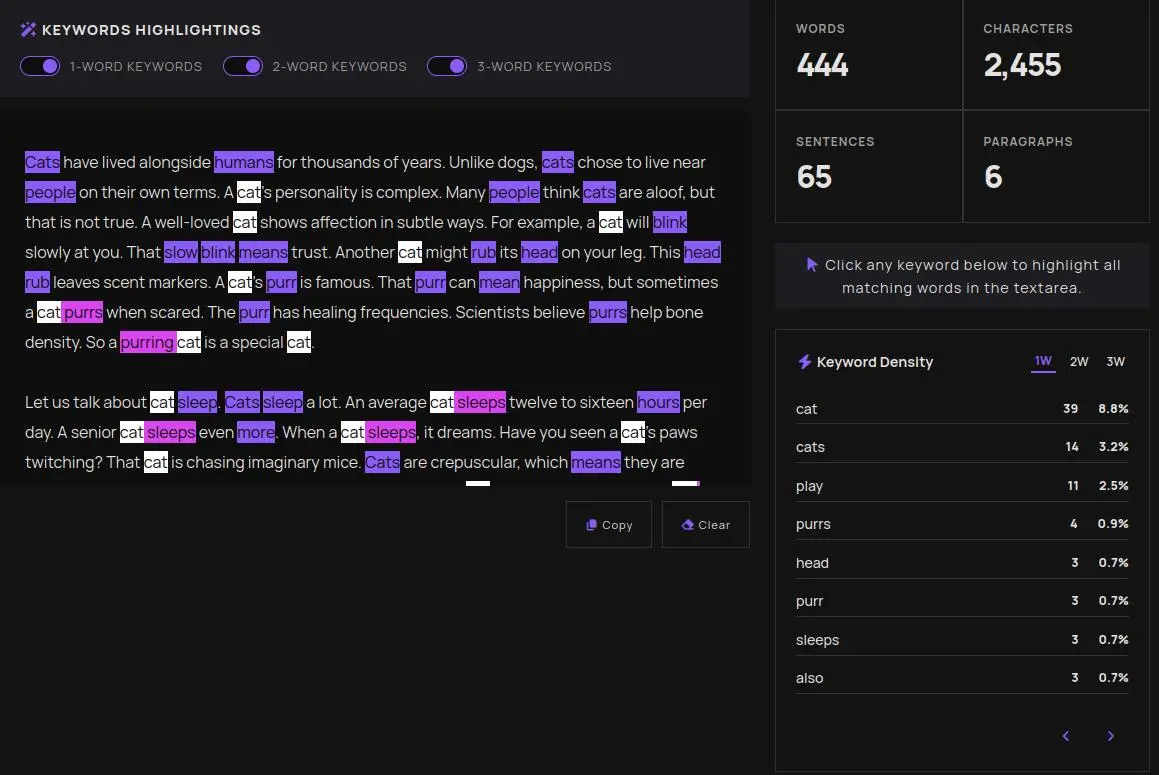
CHECK YOUR KEYWORD DENSITY
Below your stats, you will see a list of your most used words and
phrases. This is helpful for SEO when you want to avoid repeating
the same words too often. so you can filter by single words,
two-word phrases, or three-word phrases.
06
COPY OR CLEAR WITH ONE CLICK
Done? Hit the Copy button to copy your text instantly. Want to
start fresh? The Clear button removes everything in one click so
you can paste new text right away.
That's it ☑️ no complicated steps, no account needed, completely
free. Our word counter is built to be fast,simple, and genuinely
useful for students,Bloggers,Copywriters,or SEO specialists.