CleanWordCount.

Arabic Word Counter

Looking for a free Arabic word counter online? You are in the right place. Paste your Arabic text below to instantly see the word count, characters, sentences, and paragraphs. Our tool also detects repeated Arabic words and shows keyword density, which is useful for Arabic bloggers, students, and SEO writers. It is free,fast, and does not require sign-up.

Keyword Highlighting Choose which keyword lengths you want to highlight
Single words
2-word phrases
3-word phrases
READING TIME 00M 00S
SPEAKING TIME 00M 00S
100% FREE FOREVER
NO Sign-up Required
FAST Instant Results

Why Arabic Word Count Matters?


Arabic text is not always easy to measure with a basic word counter. Many texts contain a mix of Arabic words, English words, numbers, punctuation, and symbols. A simple counter can still give you a result, but that result is not always the most useful one for Arabic writing.

That is why a dedicated Arabic word counter is helpful. It gives writers a clearer way to check the length of their content and stay within the limits they need. This is useful when you are working on an essay, article, translation, caption, or any other Arabic text that needs to stay well organized.

It also helps when you want to improve the flow of your writing. Repeated words can make a text feel heavy or unbalanced, especially in longer articles. Seeing the repeated words and their density makes it easier to review your content and keep it natural.

For students, bloggers, translators, and SEO writers, this kind of checking can save time and make editing easier. Instead of guessing the length of your text, you can work with clear numbers and make better writing decisions.

Why Our Arabic Word Counter Is Different?


Most Arabic word counters only give you the basic numbers like word count, character count, sentence count, and paragraph count. That is helpful, but for many writers it is not enough.

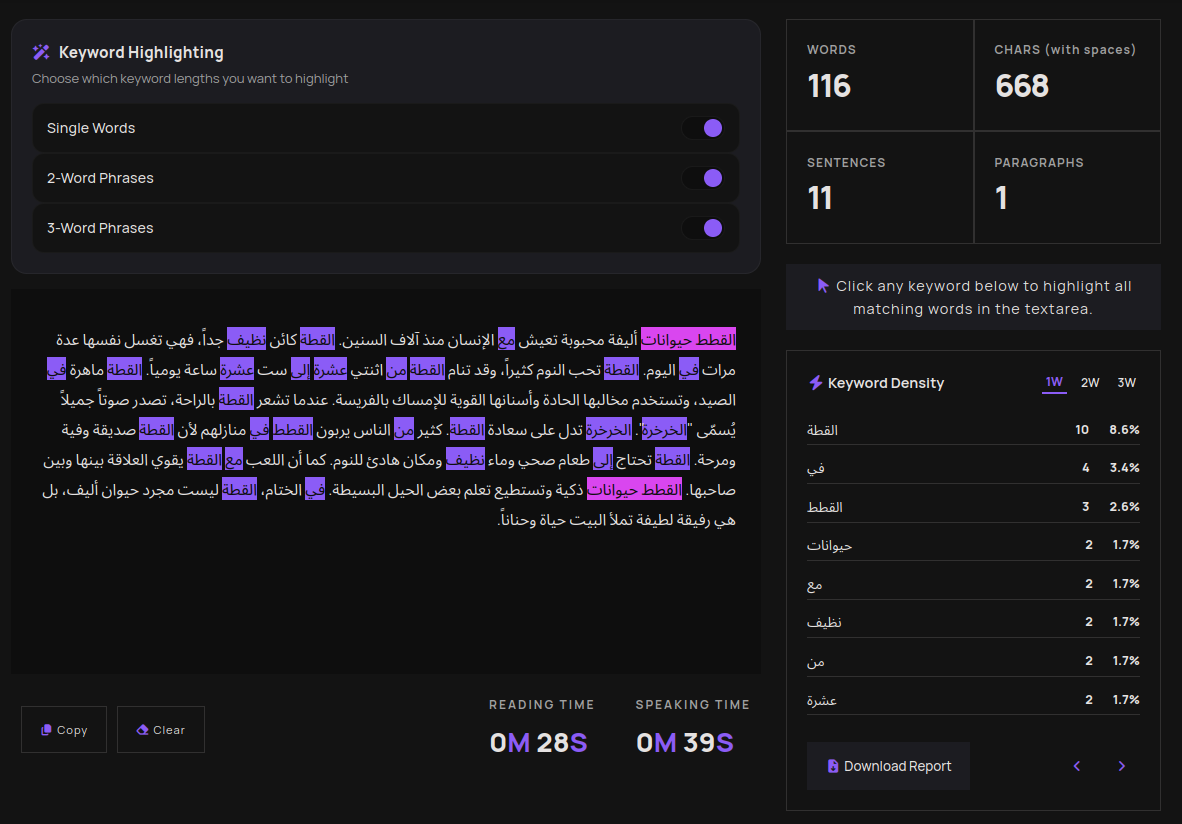
Our Arabic word counter does more than count text. It also finds repeated Arabic words and phrases, shows their keyword density, and highlights them automatically inside the text area. This makes it easier to spot repeated words and clean up your writing faster.

Arabic word counter showing word count, repeated words, and keyword density
Arabic word counter in action

Another thing that makes this tool useful is the control it gives you. You can turn single-word highlights on or off, hide two-word phrases, or hide three-word phrases whenever you want. So if the page feels too busy, you can keep only the highlights you need.

You can also click any repeated word in the list and highlight every match in the text area. That saves time when you want to focus on one word or phrase without scanning the whole text again.

At the end, you can download a report with your repeated keywords and density results. So instead of a simple Arabic word counter, you get a practical tool for writing, editing, and Arabic SEO.

Does This Arabic Word Counter Count Diacritics as Characters?


Yes. In this tool, Arabic diacritics, also called harakat, are counted as characters because the character count is based on the text exactly as you type it. That means if your Arabic text includes vowel marks or other pronunciation marks, your character count may be a little higher.

This is useful for users who want a true character count of the full text, including all letters, spaces, and marks. It is also important for people checking Arabic content for academic work, publishing, translation, or SEO, where small changes in text length can matter.

If you compare two versions of the same Arabic text, one with diacritics and one without, the version with harakat will usually have more characters. That is normal, and it is one reason why a dedicated Arabic word counter can be more helpful than a basic tool.

Does It Work With Arabic Dialects?


Yes. If you write in Moroccan, Gulf, Egyptian, or any other Arabic dialect, this Arabic word counter still counts your text. It reads the Arabic words you paste into the box and shows the word count, character count, sentences, paragraphs, and repeated words.

That said, the tool counts the text as written. It does not try to guess which dialect you are using. So whether your text is in Modern Standard Arabic or a local dialect, you still get fast and clear results.

How an Arabic Word Counter Helps You Check Mixed Text Faster?


An Arabic word counter is useful when your text is not perfectly clean or simple. Many Arabic articles, essays, and social media posts include a mix of Arabic words, English words, numbers, punctuation, and symbols. A basic counter can still give you numbers, but it does not always help you understand the text in a useful way.

That is where a dedicated Arabic word counter becomes helpful. It gives you a fast way to check the length of your text while you write, edit, or review your content. You can see the word count, character count, sentence count, and paragraph count without stopping your work.

This is especially useful for users who need to stay within a limit or keep their content clear. It also helps when you are writing in Arabic dialects or mixing dialect text with standard Arabic, because you can still count the text quickly and consistently.

While I was developing this tool, I asked my cousin, who writes articles and uses SEO, what would help people most and save them time. He said that having everything in one place would be the most useful. In real work, this saves time. Instead of counting by hand or switching between different tools, you can stay in one place and keep writing. That makes this online tool more than just a counting tool it becomes a simple way to work faster and stay organized.

How to Use This Arabic Word Counter ?


Hey! 👋 Whether you are writing an Arabic article, checking an essay, or simply counting words, this tool makes the process quick and easy.

01

PASTE YOUR ARABIC TEXT

Copy your Arabic content from a Word document, Google Docs, or any website, then paste it into the text area above. The Arabic word counter starts working as soon as you type or you paste, so there is no button to click.

02

SEE YOUR WORD COUNT INSTANTLY

As soon as you paste your text, the numbers update instantly. The tool shows you:

  • Total word count in Arabic
  • Total characters with spaces included
  • Number of sentences in your text
  • Number of paragraphs

Everything updates live as you type or edit. No need to click anything.

03

SPOT REPEATED ARABIC WORDS

This features is not available in many basic Arabic word counters. Our tool automatically highlights repeated words and phrases inside your Arabic text with colors:

  • Purple highlights single Arabic words that repeat
  • Pink highlights 2-word Arabic phrases that repeat
  • Indigo highlights 3-word Arabic phrases that repeat

This is really helpful when writing Arabic SEO content and avoiding repeated words.

04

CHECK THE KEYWORD DENSITY LIST

Next to or below your text area, you will find a full list of repeated Arabic words or phrases, how many times they appeared, and their keyword density percentage.

05

CLICK A WORD TO FOCUS ON IT

Click any word in the keyword list to highlight every place it appears in the text. Really handy when you want to clean up a specific repeated word without reading the whole text again.

06

USE TOGGLES TO CONTROL THE COLORS

If the colors feel too busy, use the 3 toggles at the top to turn off the ones you do not need:

  • Toggle 1 : show or hide repeated single words
  • Toggle 2 : show or hide repeated 2-word phrases
  • Toggle 3 : show or hide repeated 3-word phrases

That's it ☑️ fast, free, and no account needed. Whether you are a student, blogger, translator, or SEO writer, this Arabic word counter gives you everything you need in one place.
Arabic Word Counter - Frequently Asked Questions

Quick answers to the most common questions we get about counting Arabic words online.

Does this tool count Arabic words?

Yes. Just paste your text and the tool counts Arabic words correctly in real time.

Is this tool free to use?

Yes 100% free. No account, no sign up, no payment. Just open the page, paste your Arabic text and you are done.

Does this tool detect duplicate Arabic words?

Yes. The tool automatically finds and highlights repeated words and phrases in your Arabic text. Single words are highlighted in purple, 2-word phrases in pink, and 3-word phrases in indigo. You can also click any word from the keyword list to highlight every time it appears in the text.

How accurate are the results?

Very accurate. Arabic words are separated by spaces just like English and other languages, so the word count works reliably for Arabic text. The tool counts exactly what is in the text area in real time as you type or paste.

Who is this tool useful for?

Anyone who writes in Arabic like Students checking essay word limits, bloggers writing Arabic articles, translators verifying document length, or SEO writers checking keyword density in Arabic content. The tool covers all of these use cases for free.

Does the keyword density feature work with Arabic text?

Yes. The keyword density list works with Arabic the same way it does with our main page. It shows you the most repeated Arabic words and phrases, how many times each one appears, and what percentage of the total word count it represents. Very useful for Arabic SEO content writing.